Employee Onboarding
Employee onboarding is the process of familiarizing new hires with the organization’s policies, the employee’s role in the organization, and the organization’s culture. Effective onboarding process helps employees to achieve better performance and build workplace relationships. It also increases retention and reduces employee ramp-up time.
Onboarding Process
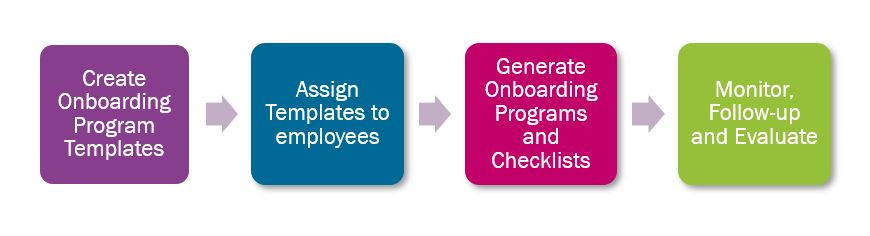
Onboarding Program Template & Onboarding Program
Onboarding Program Template consists general information, checklists and useful information for the new hire to refer. The details in the template are not specific to an employee.
Example:
Task: Arrange the workstation
Due Date: 02 days before the start date
Responsible Person: Supervisor
There are 02 types of templates.
1. New Employment
2. New Assignment
There are no restrictions according to the template type and the user can add any data regardless of the type. The purpose of having 2 types is only for easy categorization of templates. Example: The user can create a template for New Executives with New employment tasks & new assignments tasks.
Upon assigning onboarding template to an employee the Employee Onboarding programs and other checklists get created. The details in the program are specific to an employee.
Example:
Task: Arrange the workstation for John Greenwood
Due Date: 30/05/2018
Responsible Person: Roy Silva
Template Assignment
Assignment of the templates can be done through several pages such as New Employment, Single Employee Assignments, Group Employee Assignments, Onboarding Program Templates, Onboarding Program Template Details, Onboarding Program Assignments.
Selecting the best template to assign
Onboarding Assignment Configuration page can be used as a supportive tool to select the best onboarding program for the employee considering factors such as organization, employee category, job etc. When assigning a template through Assistants (New Employment, Single Employee Assignments, Group Employee Assignments) system suggests a program to the user according to the configuration.
Onboarding Program Creation
Upon assigning a template, employee’s onboarding page (My onboarding program details) and other Checklists (Onboarding Checklists, Onboarding Responsibilities) get created. Supervisors can customize the program and update the status on behalf of the employee using onboarding program details page. Also HR team can create a new program without using templates or delete an existing program.
Supervisors/HR can monitor the progress using Onboarding progress page. Onboarding Program Assignments page display all the employees, their assignment details and the details of assigned onboarding programs. This page can be used to make sure all new employees get a program assigned.
Example:
I want to view all my new employees who joined during the month of January and make sure everyone gets an
onboarding program assigned.
I want to view assignment changes of managers during the month of January and make sure everyone gets an onboarding
program assigned.
Responsible Person
A specific person or a position /organization can be defined as “Responsible By”.
There can be tasks which are responsible by an organization or position.
Example:
Task: Issue a pass
Responsibility : HR Executives in HR Department
So all the employees in HR Executive position will be responsible for the tasks. All will get the email
notification. All can see this task in Onboarding Responsibilities page. The HR Executive who takes the action will
click on “Assign to me” button and the task will be updated with the user’s name as the
responsible person.
Evaluation
Onboarding surveys are important as they provide feedback on how to improve employee onboarding processes. HR team can filter employees according to their start date and add those employees to a survey. Added employees will get transferred to the survey as participants.
Email Notifications
NOTIFY_ONBOARD_RESPONSIBLE : To send a notification to responsible person of the organization task
NOTIFY_ONBOARD_ORG_TASK_COMMENT : To send a notification to the responsible person if someone commented on the organization task
NOTIFY_ONBOARD_EMPLOYEE_TASK : To send a notification to the employees regarding their onboarding task
NOTIFY_ONBOARD_EMP_TASK_COMMENT : To send a notification to the employee/supervisor if someone commented on the employee's task
NOTIFY_ONBOARD_CHANGE : To send a notification to the responsible person if there is a change in the organization task
NOTIFY_ONBOARD_ASSIGN_SUPERVISOR : To send a notification to the supervisors regarding the employee onboarding program assignments
NOTIFY_ONBOARD_ASSIGN_EMPLOYEE : To send a notification to the employees regarding the onboarding program assignments